


What does the “Upgrade” Button on the Zoom Room Portal Do?
OVERVIEW
When updates are available, tapping on the “D7” button (see below) allows over-the-air (OTA) updating for your D7’s system at your convenience.
This article covers:
- What does the upgrade button on the Zoom Room Portal do?
What does the upgrade button on the Zoom Portal do?
When updates are available, tapping on the “D7” button (see below) allows over-the-air (OTA) updating for your D7’s system at your convenience.
In the Zoom Room Portal, you can find this in Zoom Rooms > Devices
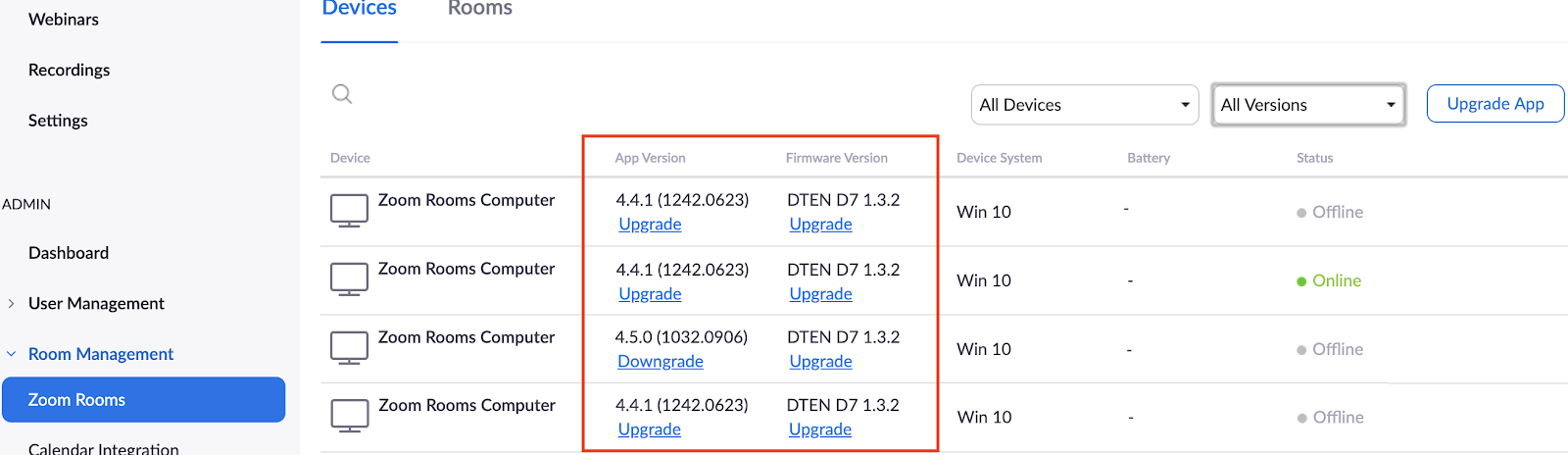
Note: You will not be able to see the above if the firmware version of your D7 device is v1.3.0 or lower. To see the above “Upgrade” options, your D7 device needs DTEN minimum firmware v1.3.2 and Zoom Rooms v4.4.1 or above. The “Upgrade” buttons will appear only when there are new versions available.
If you have additional questions or need to contact DTEN Support, please refer to this DTEN Knowledge Base article for more details: HERE.